Build Log · App
The panel, in your pocket
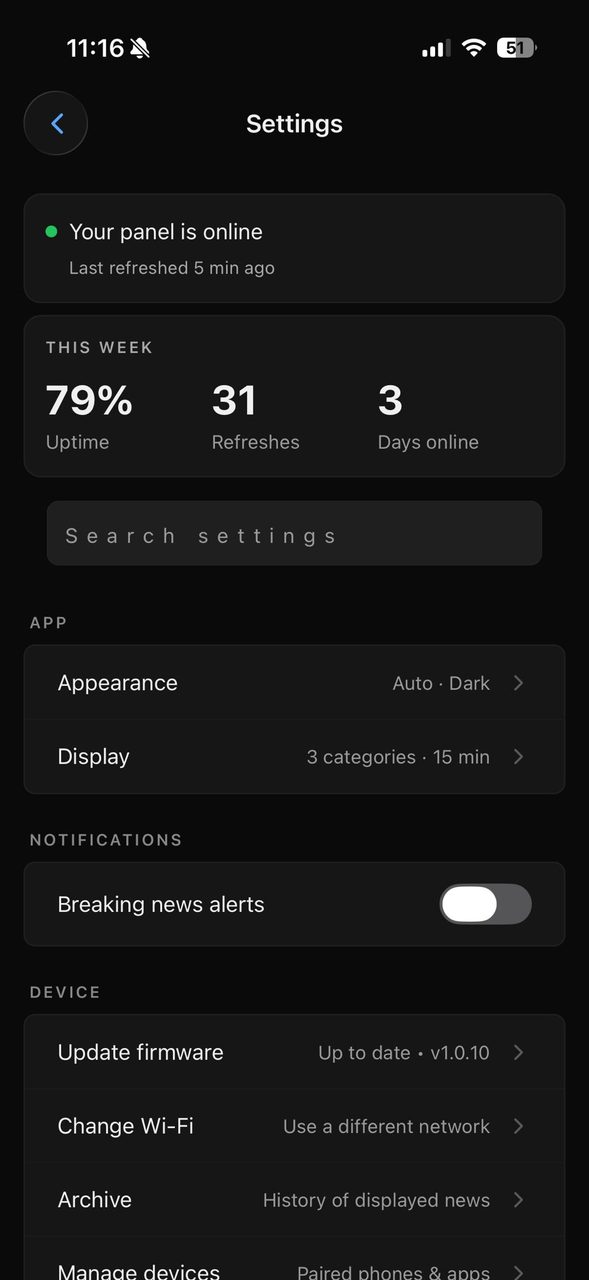
The panel is meant to be glanced at, not operated. So nearly everything you'd want to change about it lives somewhere else, on your phone. You pair once, and after that the app is just a quiet remote for a thing you mostly leave alone. You don't manage the panel. You set it up, and then it shows the news.
Is it alive?
The first thing the app answers is the only question most people have day to day. Is the panel online, and when did it last refresh? There's a green banner and a timestamp right at the top. Under that, a small week in review: uptime, how many times the page refreshed, how many days it's been running. None of it is essential to reading a newspaper. The panel doesn't need a dashboard. But it's nice to glance at one and see the thing ticking along, and the numbers are real readings off the device, not decoration.
The rare, important jobs
Under the status sit the few things you actually reach for. Appearance and display: which categories, how often it refreshes. A way to point it at a different Wi-Fi network without unboxing anything. An archive of what's been shown, for when you caught a headline in passing and want it back. And the quietly important one, firmware updates over the air. The panel can re-flash itself from the app, no cable, no taking it off the wall. The screenshot above happens to catch it on one particular build. By the time you read this it's probably moved on, which is the whole reason that update button is there.
The thing I like most is how little the app asks of you after that first pairing. It isn't somewhere you live. You open it maybe twice a year to nudge a setting, jump onto new Wi-Fi, or take an update, then close it again while the panel goes back to the one thing it does.